
The Realme Pad does what it sets out to do and that is to provide a fairly good multimedia experience plus video conferencing.

Realme's’s first foray into the world of Android tablets is a budget option that is squarely aimed at education and entertainment. Welcome, the aptly-named Realme Pad. Let’s find out if the Realme Pad can shake up the Android tablet space or not in my full review.
What’s Inside the Box?
To keep the costs low, Realme only bundles the Pad itself, 18W charger, and a Type-A to Type-C charging cable in the box. Nothing else. No case, screen guard, or earphones. I am fine with the sparse packaging, though.
How’s the Design? Does it Look and Feel Good?

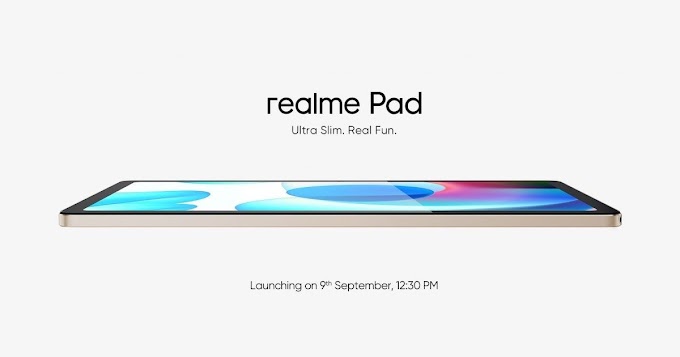
Well, the Realme Pad is chiselled from aluminium and looks pretty clean from the back. Although, this design is kind of stale now and has been done to death. As for the colour options, it is available in Grey and Gold. The Gold variant is not my aesthetic, though.
Also on the rear is the single camera placed on the top left corner and the neat Realme logo tucked away at the bottom right. There’s also this weird Silver streak that cuts through the camera, which I am not really a fan of. But, what I am a fan of, is the slim 6.9mm frame. Which, when coupled with the 440g, feels extremely light to hold and use for long durations. Realme has done a good job with the ergonomics, in my opinion. But, yes the smooth metal body of the Pad does feel slippery at times. So, don’t forget to hold it with a tighter grip.

Now, before I talk about the front, Realme really anticipates users to use this tablet in landscape mode. You can tell this from the fact that the power button is at the corner of the top edge and the volume rocker is just hanging from the ledge around that corner. Plus, the front camera is on the right bezel, which is the top bezel when you hold it horizontally. By the way, there is no fingerprint scanner, but you can use this camera to identify your face and unlock the device. Interestingly, the camera registers your face in horizontal orientation but it works flawlessly to recognise you even in vertical orientation. It’s just supremely fast, responsive, and works 10/10 times.
What I also like about the design are the uniform bezels around the display and the quad speaker setup – two on top and two at the bottom. As for the card tray on the right edge, it accepts a nano-SIM card and a microSD card as well, which means you do get expandable storage if you so need it. At the bottom edge is the Type-C 2.0 port. But, the oddest placement is the headphone port that sits right on that bottom left curvature. But, be careful when you insert your headphones. The jack doesn’t go in at an angle. You still need to insert it straight. I learnt it the hard way by making the mistake.
So yeah, the overall design of the Realme Pad is clean, inoffensive and functional, even if some find it slightly dated.
Is the Display Bright and Legible for Reading Books and Watching Shows?

The 10.4-inch IPS LCD panel has a resolution of 2000×1200 and a max brightness of 360 nits. I checked and it touched 300 odd nits but that’s with the brightness slider set to maximum. I am presuming adaptive brightness can reach the rated 360 nits. For indoor use, this display is pretty bright for watching shows on Netflix and Prime. Plus, it looks fairly vibrant too. And, if you want to read books on Amazon’s Kindle app, there’s a special Reader mode. I really made good use of it. And, if you are a night owl, you can use the Night Light mode, which can drop the brightness of the display to as low as 2 nits.
Quad Speakers? Wow! Do They Sound Good With the Dolby Atmos Feature? What About the Headphone Jack?

To add to the whole multimedia experience, the quad speakers are tuned well and you get fairly spacious sound as well. The sound quality punched above its weight and was almost as good as more premium tablets. Plus, the support for Dolby Atmos elevates the experience as well.
Is the Software Any Good? Will My Kid Enjoy Using It?
Alright, first things first. Realme is taking a hugeeeeee liberty by calling the software on the Realme Pad, Realme UI for Pad. It is basically just clean stock Android 11. If I were a software engineer with Realme, I’d probably go on a sabbatical to the mountains and switch off all my access to the outside world and wonder why, why did we go with this naming logic.
Anyway, like I mentioned, there is nothing new here. And, that is a problem. Because it is basically an enlarged version of Android 11 for the phone. Even split screen multitasking is possible on phones. Heck, we don’t even have realme UI’s familiar Assistive Ball here. Realme hasn’t spent a second tuning this software for an enhanced tablet experience. And, here’s the twist in the tale, that’s actually quite okay. Because the Realme Pad wouldn’t be able to handle Pop Up Windows or even an extra dock without stressing the hardware inside it. I’d much rather have Realme save that for an expensive tablet. Plus, there’s absolutely no bloatware whatsoever. Every single app is a Google app!
By the way, Realme is really keen on creating a safe space for your kids and therefore asks outright while setting up – who is going to use this device – an adult or a child? Additionally, Realme offers support for Kids Space that lets you create a separate supervised account and offers a very easy user interface with pre-loaded content that your kids are bound to enjoy. Plus, there are built in parental controls as well.
Is it Good for Video Calls? What About the Camera Quality?

Evidently, one of the most important use cases for a tablet is video calls. And, the 8MP fixed focus camera on the front does a fairly decent job of it. It is not exactly very crisp and sharp with 1080p 30fps video, but it is very wide and that helps create a good frame even at close quarters. As for the two mics, they picked up my voice fairly well but – if you place the tablet at a slight distance away from your face – you might have to speak louder than usual.
Now, there’s also an 8MP rear camera, which can come in handy for scanning documents. That’s about it. But, don’t expect it to capture good pictures. They remind me of cameras from the early days of the smartphone.
Can it Play Games? Does it Work Smoothly in daily use?

The Realme Pad derives all the processing power from a MediaTek Helio G80 SoC and our unit has 4GB of RAM and 64GB of eMMC 5.1 storage. This is the best you can find on budget tablets but considering the everyday performance, I would’ve appreciated more power on tap. Even, the Snapdragon 720G would’ve been a nice chip to use. Because, the tablet does feel slightly sluggish to use (Edit: Realme is soon rolling out an update to improve the performance). You have to make peace with it. And, games run fine but graphics intensive games like COD run on Medium graphics at best. But, casual games run really well and if your kid is going to have a blast breaking things by catapulting Angry Birds in the air.
Overall, I’d say for the purpose of entertainment and education, the power will suffice but if you want to game, you’ll have to keep your expectations in check or spend more.
Does the Battery Last Long Though?

It does indeed. The large 7100mAh unit inside the Realme Pad lasted me seven days on a single charge with basic usage as a supplement to my phone. Apart from this, you also get support for reverse charging other devices, and 18W fast charging support as well.
Thanks for reading till the end of this article. For more such informative and exclusive tech content, explore my website❤.



2 Comments
Nice
ReplyDeleteThank You.
DeleteSubscribe our newsletter for upcoming tech related news.